Your Next Action is: Download NextAction!
secretGeek .:dot Nuts about dot Net:.
home .: about .: sign up .: sitemap .: secretGeek RSS

Your Next Action is: Download NextAction!

Next Action

The Top Of Your Mind Is A Very Very Small Place.

And NextAction -- is a Very Very Small application to manage the top of your mind.

It boasts less features than any other self-management tool.

Hence it is more effective.

There is no configuration -- NONE! and not even a save button. Saving and loading happen automatically.

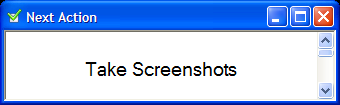
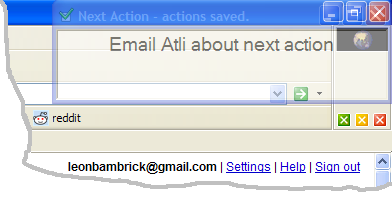
Next action is always on top, and always out of the way. It only has one purpose: to help you track what you are doing right now, and to keep this at the top of your mind.

It's from the team that brought you TimeSnapper and it is free.

Download NextAction Download NextAction!

Enjoy!

Bugs, help requests, ideas... send em in...
 

NextAction in Action


'lb' on Thu, 02 Nov 2006 20:57:33 GMT, sez:

Oh, by the way it's 27 Kb, zipped and requires .Net framework 1.1

(it's 224 Kb unzipped... mostly due to the icon!)


'Corey' on Fri, 03 Nov 2006 00:27:28 GMT, sez:

nice work.

I like the minimalism.
but I think it would be cool if it had some configurations (perhaps not even in the UI, but from a config file), so it could be used for unformatted text in a configurable font and alignment (i'm thinking of a temporary space to keep bits of source code that you are hacking). I am always opening my text editor just to paste something for a few seconds that i will soon cut again and close.

(also can it be set stationary?)


'Gavin' on Fri, 03 Nov 2006 00:49:57 GMT, sez:

Corey: You need a clipboard management application. There are plenty for windows, but they basically let you cut and cut and cut (and copy) and then access that history.


'lb' on Fri, 03 Nov 2006 00:53:23 GMT, sez:

@gav:
>let you cut and cut and cut (and copy) and
>then access that history.

clipboard helpers don't help too much with this process:

cut (or copy), paste --> manipulate --> then copy and paste.

@corey:
>some configurations

nein!!


'Gavin' on Fri, 03 Nov 2006 05:01:56 GMT, sez:

> clipboard helpers don't help too much
> with this process:
true, true.


'Zooba' on Fri, 03 Nov 2006 06:19:08 GMT, sez:

Gah! It's one of those jumping things! Hmm... would an evil laugh every time it jumps be too much of a feature to add?


'Jón Arnar' on Fri, 03 Nov 2006 10:48:26 GMT, sez:

Here is an interesting bug:

Move the Action windows to the bottom of the screen. Press the Windows key to pop up the start menu. The task bar will then cover the lower half of the Action window. The action window will not move to the foreground until you have activated it yourself.

Other than that.. I like it!


'Wesley Shephard' on Fri, 03 Nov 2006 13:15:08 GMT, sez:

OMG Ponies. Someone turned the old "you can't click this button" gag into a productivity application? Inspired!


'Matt Casto' on Fri, 03 Nov 2006 13:28:15 GMT, sez:

I like it!

It would be nice if it jumped to the corners of secondary monitor(s) in addition to the main monitor.


'David Blume' on Fri, 03 Nov 2006 15:27:15 GMT, sez:

Very similar to my Next Action homepage, which displays only the one thing you should be focusing on, instead of browsing the web.


'martin' on Fri, 03 Nov 2006 19:03:13 GMT, sez:

I second the request of Jón Arnar.


'Mike Woodhouse' on Mon, 06 Nov 2006 08:39:31 GMT, sez:

Does it have an API? I think we need to be able to create mashups. Or something.


'Greg' on Mon, 06 Nov 2006 12:33:04 GMT, sez:

Installed it, don't see the value in it for me, it's annoying for me, how can I uninstall it?

greg@(removed).net


'edddy' on Wed, 08 Nov 2006 13:42:56 GMT, sez:

Like it very much (I have problems concentrating in the next thing)

New features, I don't really need something else but...

Feature request:
* Remove the window title
* Move it above the taskbar
* Change the text in the task bar for the next action instead of "next action - actions saved" or remove it and put it in the status bar


'Bernard Vander Beken' on Thu, 09 Nov 2006 05:18:17 GMT, sez:

Nice app.

Suggestions to make updating faster:
- Make CTRL+A select all text while text box has focus.
- Triple mouseclick on text to select all (the way Word does it).


'lb' on Thu, 09 Nov 2006 08:44:37 GMT, sez:

>Triple mouseclick on text to select all
>(the way Word does it).

nice idea... but how do you implement triple click?? do i have to look at click and check that only so much time has elapsed between events etc? (and would this correctly reflect the user's double-click speed) or is there some nice reliable .net way to do it?

Some other features are being added, by the way...


'lb' on Thu, 09 Nov 2006 10:00:36 GMT, sez:

NEXT ACTION has been upgraded!

New features:

1. Global Hot Key: Windows key + N
2. Now floats above the taskbar
3. Ctrl+A -- select all
4. Triple Click to select a paragraph
5. Ctrl+DownKey: moves current paragraph to the bottom of the list, without losing current location (this is the act of
completing a task)


'Bernard Vander Beken' on Thu, 09 Nov 2006 16:50:30 GMT, sez:

Thanks for the update. The only remaining thing I can think of is this: use a system tray icon to save space in the task bar.


'pablo' on Mon, 13 Nov 2006 09:06:31 GMT, sez:

Handy.

Would it be possible to get it to stay on the second monitor when placed there?


'Rob Williams' on Wed, 15 Nov 2006 10:43:13 GMT, sez:

Leon, this is great! I can only imagine Mr Postit is rapidly reconsidering his position as industry leader in Top Of The Mind management.


'martin again' on Tue, 28 Nov 2006 00:15:27 GMT, sez:

Close. :) You accounted for the taskbar size, but not the position. I have my taskbar at the top of the screen and double height, so now my next action is double height off the bottom of the screen and still overlaps on top. Use SPI_GETWORKAREA with SystemParametersInfo.


'lb' on Tue, 28 Nov 2006 00:18:54 GMT, sez:

>taskbar at the top of the screen and
>double height

tricky!!

>SPI_GETWORKAREA with SystemParametersInfo.

ah! that'll solve it.

cheers Martin!
no time to upgrade just yet though i am afraid... i'll paste it in the middle of my own instance of nextaction... it'll float to the top in good time.


'lb' on Tue, 28 Nov 2006 00:19:33 GMT, sez:

i'll probably rename it to 'Top Of Your Mind' or 'top of mind' or something along those lines, soon too.

'soon' being a relative term in this case.


'martin again' on Tue, 28 Nov 2006 01:02:28 GMT, sez:

Ooh, one more thing, but much less important. I switch between an external and laptop monitor with different resolutions and currently NextAction assumes the same resolution from when it started. I'm not sure how to handle that automatically, but if you could fix that then we can be best friends forever.


'lb' on Tue, 28 Nov 2006 01:16:22 GMT, sez:

>I'm not sure how to handle that
>automatically

in TimeSnapper, Atli showed me how to handle events for when a laptop has resumed from hibernation/sleep (one or the other).

i guess this isn't quite relevant. hmm. Do other apps have this same issue, generally? do they resize correctly... i guess i could re-read the SPI_GETWORKAREA at times.

i've never tested what happens in nextaction with multiple monitors at once -- if you can get me some feedback on that i'd appreciate it...?

cheers


'lb' on Thu, 30 Nov 2006 00:13:55 GMT, sez:

bug report: if you use ctrl-down to mark a task as done, it puts this task into your clipboard, which is annoying and unintended!


'Lauretn' on Thu, 30 Nov 2006 08:55:54 GMT, sez:

A great tool! I really loved it, there is always this phone call or mail I forgot to do, not anymore...

I should not be allowed to minimize the Next Action window.

Thanks

Laurent


'Mad William Flint' on Thu, 01 Mar 2007 11:53:07 GMT, sez:

Do you have a synopsis of the actual functionality someplace? It looked like nothing special when I ran it, then I started playing around and noticed it did some neat stuff.

I don't mind discovering things, but a general feature list would be nice.


'lb' on Sun, 11 Mar 2007 18:54:32 GMT, sez:

just to keep people updated -- there's a new version of NextAction coming soon.

It has a context menu with a bunch of configuration parameters.

It also fixes a few bugs.

When I blog about it I'll post up 'a synopsis of the actual functionality' as it stands at that point -- and i'll include a small help file with the revised application, that will describe all the features.

cheers
lb


Further comments disabled due to spam. Sorry.


Articles

TimeSnapper hits the local press... and more on Iceland TimeSnapper hits the local press... and more on Iceland
MVC Zen Garden MVC Zen Garden
Is Corporate IT a form of emotional abuse? Is Corporate IT a form of emotional abuse?
Java Powered Internet? WTF? Java Powered Internet? WTF?
Life is Upstream Life is Upstream
TimeSnapper 3.3, and News From Iceland TimeSnapper 3.3, and News From Iceland
Growing Up Geek (A Hanselmeme) Growing Up Geek (A Hanselmeme)
Is that all you've got!? Is that all you've got!?
TimeSnapper 3.2: What are you afraid of? TimeSnapper 3.2: What are you afraid of?
Babbage and Boole! Babbage and Boole!
Downloadable Slide-decks: Downloadable Slide-decks: "Build your own Tiny Software Company"/"F# eye for the C# guy"
Simple Trouble Shooting Application Now Fixes Everything Simple Trouble Shooting Application Now Fixes Everything
a simple checklist for trouble-shooting regular problems a simple checklist for trouble-shooting regular problems
secretGeek at Tech-Ed: secretGeek at Tech-Ed: "How to build your own Tiny Software Company"
Bambrick versus Hanselman: Bring it! Bambrick versus Hanselman: Bring it!

Archives .: secretGeek :: Complete Archives :.
25 steps for building a Micro-ISV 25 steps for building a Micro-ISV
3 minute guides -- babysteps in new technologies: powershell, JSON, watir, F# 3 Minute Guide Series
Top 10 SecretGeek articles Top 10 SecretGeek articles

Downloads

TimeSnapper -- Automated Screenshot Journal TimeSnapper.com    
Version 3.3: true productivity boost

ShinyPower (help with Powershell) ShinyPower
Now at CodePlex

Next Action NextAction
Managing the top of your mind


[powered by Google] 


World's Simplest Code Generator (html edition) World's Simplest Code Generator
Gradient Maker -- a tool for making background images that blend from one colour to another. Forget photoshop, this is the bomb. Gradient Maker
How to be depressed How to be depressed
You are not inadequate.


Recommended Reading

The Best Software Writing I
The Business Of Software (Eric Sink)

Recommended blogs

Jeff Atwood
Reginald Braithwaite
Joseph Cooney
Phil Haack
Scott Hanselman
Julia Lerman
Joel Pobar
Eric Sink
Joel Spolsky
Des Traynor

Aggregated Links

programming.reddit.com
dzone
dot net kicks

Human Link Machines

interesting finds
a continuous learner's weblog
arjan's world
n links today
new and notable
morning coffee
learning .net
weekly link post
(my del.icio.us account)

LinkedIn profile
 
home .: about .: sign up .: sitemap .: secretGeek RSS .: © Leon Bambrick 2006 .: privacy

home .: about .: sign up .: sitemap .: RSS .: © Leon Bambrick 2006 .: privacy