Dialog Between a Man and His Vista Laptop
secretGeek .:dot Nuts about dot Net:.
home .: about .: sign up .: sitemap .: secretGeek RSS

Dialog Between a Man and His Vista Laptop

original article before discard

While continuing the cleanup instigated by the previously mentioned documentary, I threw out quite a lot of stuff.

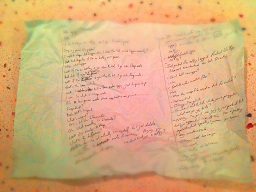
One piece of paper had the following dialog that I transcribed before discarding. It concerns a man and his Vista laptop.

—Hello laptop.
—Hello user!
—I'd like to change some settings, can I open the control panel?
—[long, long pause] No problem!
—I want to change what happens when I close the lid. What happens currently?
—[extended pause] Well that depends if I'm on a battery or plugged in.
—Why, what's the difference?
—[assume long pauses unless told otherwise] Well, if I'm on battery and you close the lid, I go into sleep mode.
—And? If you're plugged in?
—Well, if I'm plugged in and you close the lid, I go into sleep mode.
—That's the same isn't it?
—Well, I kill a few apps, just to spice it up.
—I see. So what is sleep mode?
—It's a low power mode where applications are paused.
—Suspended?
—No, that's suspend.
—What's suspend?
—It's a bit like hibernate.
—Oh. What exactly is hibernate?
—Well... it's somewhat similar to sleep.
—What's the specific difference between all of those?
—Hmmm. Well, let me see. It's very... There's... Well Okay. I'm not completely sure myself. So I just delete a few extra files to make it convincing. Ah, anyway, you were wanting to change a setting?
—Frankly, I'm a little concerned now. But all I want to do is make sure that if I just close the lid, and if you're plugged in to a power supply, then I want you to just do nothing.
—Nothing?
—Just pretend like nothing's happened. Pretend I haven't event touched the lid.
—Can I kill some apps?
—No.
—Delete a few smallish files?
—No.
—Move the swap file around on disk. Jiggle it a bit?
—Not even that.
—What if I 'clean up' the registry or terminate some services?
—No, not that either.
—Nothing fancy at all?
—Nothing.
—Okay, Sir. It's your dime.
—So when I shut the lid, while you're plugged in to a power supply, what are you going to do?
—Nothing much.
—Nothing much?
—Okay, nothing at all. I'm going to pretend you haven't even touched the lid and that you're still watching very closely. I can do this. I'm a pretty sophisticated operating system you know. I'm not some version two or three operating system. I am Windows Vista, the most eagerly anticipated operating system in the history of windows operating systems. All of this tricky 'do nothing stuff' is considered elementary to a system like me. Go ahead.
—Okay here we go.
—No problem! Bring it on.
—You're definitely ready?
—Ready as ever. A little bit excited actually.
—Here goes.
Man gingerly closes the lid. Without a pause we hear the hard drive grind to a halt. Lights flicker out.
[man performs a facedesk]


'Eduardo' on Fri, 21 Sep 2012 18:20:16 GMT, sez:

Lol. Your best piece in a while


'rambo' on Sun, 23 Sep 2012 13:31:17 GMT, sez:

Suspend, hibernate, sleep, shutdown... they need Nanna Nap mode, Siesta mode, forty winks mode, resting my eyes mode, Slightly Concussed mode, and Sleep of the Dead mode as well so that customers can really be Completely Confused.


'Pitarou' on Mon, 08 Oct 2012 01:55:06 GMT, sez:

Just a thought: maybe some sneaky, corner-cutting laptop manufacturer wired up the "lid closed" switch to the "go to sleep" button?

Reminds me of the hoops I have to jump through to persuade my laptop that this USB keyboard I've just plugged in really is a Japanese keyboard.

"But Plug 'n' Play says it's American."

"I don't care what Plug 'n' Play says. I can see the keycaps and I say it's Japanese."

"Okey-dokey. Japanese mode engaged. Now you can type in Japanese ... on your American keyboard."


name


website (optional)


enter the word:
 

comment (HTML not allowed)


All viewpoints welcome. Incivility is not tolerated, such comments are deleted.


I'm the co-author of TimeSnapper, a life analysis system that stores and plays-back your computer use. It makes timesheet recording a breeze, helps you recover lost work and shows you how to sharpen your act.


NimbleText - FREE text manipulation and data extraction

NimbleText is a Powerful FREE Tool

I wrote this, and use it every day for:

  • extracting data from text
  • manipulating text
  • generating code

It makes you look awesome. You should use NimbleText, you handsome devil!


Articles

AddDays: A Very Simple Date Calculator AddDays: A Very Simple Date Calculator
Google caught in a lie. Google caught in a lie.
NimbleText 2.0: More Than Twice The Price! NimbleText 2.0: More Than Twice The Price!
A Computer Simulation of Creative Work, or 'How To Get Nothing Done' A Computer Simulation of Creative Work, or 'How To Get Nothing Done'
NimbleText 1.9 -- BoomTown! NimbleText 1.9 -- BoomTown!
Line Endings. Line Endings.
**This** is how you pivot **This** is how you pivot
Art of the command-line helper Art of the command-line helper
Go and read a book. Go and read a book.
Slurp up mega-traffic by writing scalable, timeless search-bait Slurp up mega-traffic by writing scalable, timeless search-bait
Do *NOT* try this Hacking Script at home Do *NOT* try this Hacking Script at home
The 'Should I automate it?' Calculator The 'Should I automate it?' Calculator
aaron swartz: the early works aaron swartz: the early works
Finding (and removing) duplicate files on your hard drive Finding (and removing) duplicate files on your hard drive
Harvey, a .net chat server built with RabbitMQ Harvey, a .net chat server built with RabbitMQ
LeonBambrick.com LeonBambrick.com
So your domain has been stolen. What now? So your domain has been stolen. What now?
kv can remember it for you, wholesale kv can remember it for you, wholesale
Hello IT Department Hello IT Department
Dialog Between a Man and His Vista Laptop Dialog Between a Man and His Vista Laptop
NimbleText 1.6, Codename Jetboat NimbleText 1.6, Codename Jetboat
On Task Hoarding and Todo Bankruptcy On Task Hoarding and Todo Bankruptcy
Developer UI Done Right: Mercurial Commandline! Developer UI Done Right: Mercurial Commandline!
Rediscovering the Amstrad CPC 6128 Rediscovering the Amstrad CPC 6128
Just Wally Just Wally
The Correct Order for a First Time Viewing of The Lord Of The Rings The Correct Order for a First Time Viewing of The Lord Of The Rings
A new era for Android. A new era for Android.
Mind-boggling Demo of New Gaming Genre, aka Folder-Based Hangman, aka Fun with Recursion Mind-boggling Demo of New Gaming Genre, aka Folder-Based Hangman, aka Fun with Recursion
Got CSV in your javascript? Use agnes. Got CSV in your javascript? Use agnes.

Archives Complete secretGeek Archives

TimeSnapper -- Automated Screenshot Journal TimeSnapper: automatic screenshot journal

25 steps for building a Micro-ISV 25 steps for building a Micro-ISV
3 minute guides -- babysteps in new technologies: powershell, JSON, watir, F# 3 Minute Guide Series
Universal Troubleshooting checklist Universal Troubleshooting Checklist
Top 10 SecretGeek articles Top 10 SecretGeek articles
ShinyPower (help with Powershell) ShinyPower
Now at CodePlex

Realtime CSS Editor, in a browser RealTime Online CSS Editor
Gradient Maker -- a tool for making background images that blend from one colour to another. Forget photoshop, this is the bomb. Gradient Maker


[powered by Google] 


How to be depressed How to be depressed
You are not inadequate.


Recommended Reading


the little schemer


The Best Software Writing I
The Business Of Software (Eric Sink)

Recommended blogs

Jeff Atwood
Joseph Cooney
Phil Haack
Scott Hanselman
Julia Lerman
Rhys Parry
Joel Pobar
OJ Reeves
Eric Sink

Aggregated Links

proggit
dzone
hacker news
dot net kicks

Human Link Machines

interesting finds
a continuous learner's weblog
arjan's world
weekly link post

LinkedIn profile
LogEnvy - event logs made sexy
Computer, Unlocked. A rapid computer customization resource
Aussie Bushwalking
BrisParks :: best parks for kids in brisbane
PhysioTec, Brisbane Specialist Physiotherapy & Pilates
 
home .: about .: sign up .: sitemap .: secretGeek RSS .: © Leon Bambrick 2006 .: privacy

home .: about .: sign up .: sitemap .: RSS .: © Leon Bambrick 2006 .: privacy