Tip o the day: Copy Text from MessageBox/Msgbox
 You learn a little every day. Today I learnt that you can use Ctrl-C to copy the text from a message box in windows. Hence given the following MessageBox:
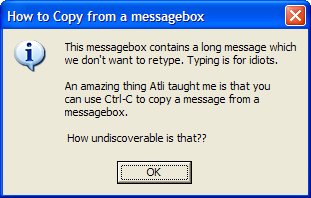
Hit Ctrl-C, and the following will be copied to your clipboard:
---------------------------
How to Copy from a messagebox
---------------------------
This messagebox contains a long message which
we don't want to retype. Typing is for idiots.
An amazing thing Atli taught me is that you
can use Ctrl-C to copy a message from a
messagebox.
How undiscoverable is that??
---------------------------
OK
---------------------------
Thanks to Atli -- chief developer of TimeSnapper.
'Carlin' on Wed, 26 Apr 2006 05:31:03 GMT, sez: And all this time i've been retyping text in Alert Boxes, should of known there would be something simple like that to make it easier.
'Simon' on Wed, 26 Apr 2006 07:02:39 GMT, sez: Wow! That's brilliant! How come I never knew that one?
'Derek' on Wed, 26 Apr 2006 11:48:07 GMT, sez: ALT-PRNT SCRN is my normal solution to this problem.
But I'm definitely going to try this the next time I need to report on a message box error.
'zonker' on Wed, 26 Apr 2006 16:59:40 GMT, sez: It doesn't seem to work with Javascript alert boxes but it's still a very cool feature nonetheless. Thanks for the helpful tip!
'Magnus Mendeylev' on Wed, 26 Apr 2006 20:47:12 GMT, sez: Inspirational... another helpful hint from the house of SecretGeek!
Cheers L!
'gav' on Wed, 26 Apr 2006 23:02:36 GMT, sez: yo Zonker: it works with ie7 javascript boxes. Not sure about ie6.
Doesn't work with mozilla.
'japi' on Thu, 27 Apr 2006 05:35:04 GMT, sez: it DOES work with IE6 javascript alert boxes.
it may seem to be not working at first hand when you paste in a textbox. That's because of the first line "------------" and the newline character after that.
Try pasting in a multiline text input (notepad)
(Comments disabled due to spam)
|