Leaky Abstractions? Try Asp.Net!
First here's a code example: Single line 'TextBox': <asp:TextBox ID='dd1' runat='server' TextMode="SingleLine" MaxLength="10"> </asp:TextBox> ^^^^This 'MaxLength' is respected!
Multi line 'TextBox': <asp:TextBox ID='dd1' runat='server' TextMode="MultiLine" MaxLength="10"> </asp:TextBox> ^^^^This 'MaxLength' gets ignored!
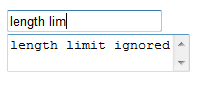
Now here it is in pictures:  The single-line TextBox respects the maximum length property. The multi line textbox does not. We see other differences too: these two 'TextBoxen' differ from each other in far more than the number of rows. The cause here is a classic 'Leaky Abstraction' - and asp.net is riddled with such leaks. The 'abstraction' of "TextBox" is used to emit either one of three underlying html elements -- "TextArea", "Input type=text" or "input type=password" -- depending on the 'TextMode' property. The three controls are wildly different animals. "Solutions" to this problem tend to use javascript to stop input once the maxlength is reached. Edge cases are frequently missed, for example: - Once maxlength is reached, ignore input, but don't ignore: Arrow keys, Delete key and Backspace. Others?.
- Pasting of text should truncate down to maxlength.
- Disabling of javascript is always possible, so length validation needs to be applied on server side as well.
- Now that javascript is in play, browser compatability becomes a bigger problem.
That's pretty nasty stuff to have to perform -- and worse, you're given no warning that you need to perform it. The API tells you that there is a maxlength property you can use... but the API, in this case, is lying. I'm not really concerned with this problem technically. And I think the asp.net abstraction is so extreme that it's admirable. I'd like to know how to patch this kind of leak. Here's what I'm wondering: Is there a way the text box class could have been implemented so that you get a compile error for setting the maxlength property when the textmode is multiline? That would be enough to make it a safe abstraction in my books. It's more extreme than the static typing afforded by most static type systems. I expect that such a constraint could be achieved with a language/tool like Spec#. An alternative would be to throw an exception when setting the maxlength property if the textbox type is multi-line, and vice versa. But that seems like quite a faulty approach. I'm just not happy about this at all. I think I will need to write a very stern letter to Scott Guthrie.
'Steve' on Mon, 26 May 2008 19:14:31 GMT, sez: I too was stung by this particular "feature". To get around it I developed a control extender to perform the tasks you've highlighted in your article, which I then put up on codeplex (http://www.codeplex.com/ajaxcontrolextenders). Check it out, see if you find it handy and feel free to modify it if it's not quite what you wanted :)
'mike' on Mon, 26 May 2008 20:08:57 GMT, sez: >Is there a way the text box class could have been implemented so that you get a compile error for setting the maxlength property when the textmode is multiline?
That doesn't seem to me like it would solve the problem. If the abstraction is that a single TextBox class renders the appropriate, you know, stuff, and if the maxlength property is available on that class, why should I end up with compile-time errors because I in all innocence set this property when textmode happens to be set to multiline mode? Understanding why maxlength doesn't work if the box is set to multiline is a big ol' leaky hole in the abstraction, no?
The correct solution (again, as it seems to me) is to have the TextBox class render the appropriate, you know, stuff to make it all happen correctly. Or to change the model so that the multiline text box inherits via a different path that ends up with that class not exposing a maxlength property.
But what do I know? I'm just a VB guy.
'lb' on Mon, 26 May 2008 20:39:53 GMT, sez: @steve -- that is excellent work. It's quite a bunch of dependencies to take for getting around just this one problem. But there's a good chance the developer has already taken onboard the ajax control toolkit, so this is well mitigated.
Open sourcing your solution like that is also very good, as it means that any bugs/edge cases you've missed can be raised and addressed.
@mike
>have the TextBox class render the
>appropriate, you know, stuff
This would be pretty hard to do -- and it would still be leaky. (Would suddenly require javascript for example).
>change the model so that the multiline
>text box inherits via a different path
I thought about that... then you'd have <asp:TextBox and <asp:TextArea ....
this would be a good solution from my POV but wouldn't match with the Asp.net webforms (implied) goal of trying to make the web look like a big old VB6 application.
But more importantly Mike, did you like the use of the plural 'textboxen' ? I had you in mind when I wrote that one ;-)
'Dom' on Mon, 26 May 2008 20:50:19 GMT, sez: Nasty business this. Here's a solution I've used in the past which utilises a behavior:
In your stylesheet, add:
TEXTAREA { behavior: url(maxlength.htc);}
Save the following into a file called 'maxlenth.htc':
<PUBLIC:COMPONENT id="bhvMaxlength" urn="maf:Maxlength">
<PUBLIC:PROPERTY name="maxLength" />
<PUBLIC:ATTACH event="onkeypress" handler="doKeypress" />
<PUBLIC:ATTACH event="onbeforepaste" handler="doBeforePaste" />
<PUBLIC:ATTACH event="onpaste" handler="doPaste" />
<SCRIPT language="JScript">
// Keep user from entering more than maxLength characters
function doKeypress(){
if(maxLength && value.length > maxLength-1){
event.returnValue = false;
maxLength = parseInt(maxLength);
}
}
// Cancel default behavior
function doBeforePaste(){
if(maxLength)
event.returnValue = false;
}
// Cancel default behavior and create a new paste routine
function doPaste(){
if(maxLength){
event.returnValue = false;
maxLength = parseInt(maxLength);
var oTR = element.document.selection.createRange();
var iInsertLength = maxLength - value.length + oTR.text.length;
var sData = window.clipboardData.getData("Text").substr(0,iInsertLength);
oTR.text = sData;
}
}
</SCRIPT>
</PUBLIC:COMPONENT>
Now you're maxlength property on your textarea will be respected:
<TEXTAREA MAXLENGTH=50></TEXTAREA>
It uses Javascript of course. You should use a validator on the server side to ensure nothing is getting past, for example if JS is turned off in the browser.
The control extender solution is cool too.
'Dom' on Mon, 26 May 2008 21:00:25 GMT, sez: Oh I forgot to mention, if you're not specifically targeting IE, you might want to convert this script to a standard JS file, rather than a JScript Behaviour.
'Doekman' on Tue, 27 May 2008 13:45:37 GMT, sez: With compile time metaprogramming (or Template metaprogramming on wikipedia) you could do something. Someone at fogcreek wrote something about Wasabi and compile time metaprogramming.
Another edge case: a new line is in IE 2 characters, but in Firefox it's 1 character...
|