Idea: Ribbon Bar Item Finder
secretGeek .:dot Nuts about dot Net:.
home .: about .: sign up .: sitemap .: secretGeek RSS

Idea: Ribbon Bar Item Finder

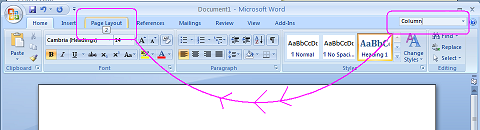
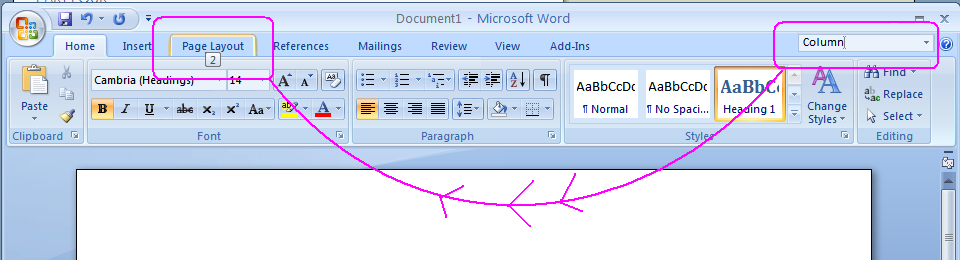
type in the property you want and the relevant tab will light up with the control highlighted

As a special reward to the people with longer attention spans, I've included a joke near the end of this blog entry. I highly recommend continuing up to that point, at least, as it is certainly one of the funnier jokes that has been written since, let us say, the invention of trans-human discourse.

But first, here's a free idea which I would like to share with our old buddies, the Office Team: why not add a 'finder' at the top of your nifty ribbon bars?

Just say you're using Winword.exe from Office 2007 and you're hunting through the ribbon bar looking for something. In this case you're wondering...

"Hmmm. how do i create a two-column layout?"

Here's my suggestion:

A small textbox at the top right could act as a navigation aid, and would also search the document.

In the example, as we type "column" into the 'finder' any tabs that contain 'Column' related properties would light up in some ambient way, with an indication of how relevant they are. (In the screenshot I've got the number "2" appearing, as if to say 'There are two Column-related items in this tab right here!')

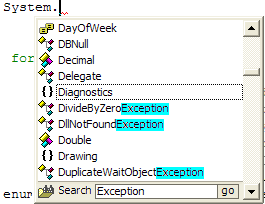
This behaviour would happen 'as you type', much like incremental find in firefox and visual studio.

I for one could use this feature all the time.
type in the property you want and the relevant tab will light up with the control highlighted

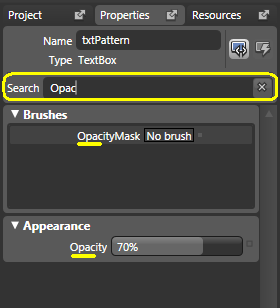
The idea is inspired by vista's start menu search box, and by the property search experience in expression blend:
property search in expression blend

(I wanted something similar in Janus property inspectors and intellisense a few years ago)
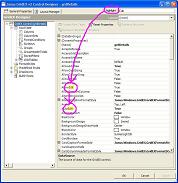
Intellisearch highlight the words you're looking for

And now for my very funny joke. You've been good. Prepare for an excellent reward.

Q: Why did the retired mathematician sell his blackboard?

A: Because he had nothing left to prove.

2.5 dimensional view of document layout

Also here's a recent article by Paul Stovell where he suggests some changes to the designer concept for WPF. My favourite thought here is the 2.5 dimensional view of the layout. Clever stuff.


'mike' on Thu, 29 Nov 2007 12:54:42 GMT, sez:

I can't decide whether this is a brilliant idea or whether it's the height of irony that one might even need a search system just to find, you know, a menu item. Mind you, as a person who's spent, what, a decade and a half navigating Word's menus, I'm not finding the ribbon particularly easy going. Where, oh where, can that item have gone? Oh, where, oh, where can it be?


'Ryan Patterson' on Thu, 29 Nov 2007 13:03:15 GMT, sez:

Jeff Atwood wrote a post about this a while back :)

http://www.codinghorror.com/blog/archives/000887.html


'Orestis Markou' on Thu, 29 Nov 2007 13:03:26 GMT, sez:

Check out Leopard's help functionality, it pretty much does what you want in every app.


'Josh Marshall' on Thu, 29 Nov 2007 17:33:45 GMT, sez:

Oretis beat me to it, but I thought I'd demo it for you:
http://www.flickr.com/photos/jpmarshall/2073764971/


'lb' on Sun, 02 Dec 2007 21:31:22 GMT, sez:

about the scout app which does this and more... mary jo foley has the scoop:

http://blogs.zdnet.com/microsoft/?p=237


'Matthew' on Mon, 03 Dec 2007 00:18:44 GMT, sez:

Your link in the RSS feed (http://secretgeek.net/ribbonfinder.asp.asp) doesn't work. Get rid of one of the .asp bits.


'Rinat Abdullin' on Mon, 03 Dec 2007 06:44:01 GMT, sez:

I recall reading one article about that Fluent Interface of Microsoft (with screenshots). They used to have search (items were being filtered as you type) but then decided to get rid of it. Given the amount of investments in this Ribbon UI, I'm sure there was some decent reason behind.


PS: +1 for the broken link in RSS feed.


name


website (optional)


enter the word:
 

comment (HTML not allowed)


All viewpoints welcome. But the right to delete any post for any reason is reserved. Don't make me do it. Comments may be republished, emailed to your loved ones or printed and used as toilet paper. Who reads this legal bit anyhow?

TimeSnapper is a life analysis system that stores and plays-back your computer use. It makes timesheet recording a breeze, helps you recover lost work and shows you how to sharpen your act.

TimeSnapper won last year's Developer Competition at Larkware.com, and is used by over 10,000 people.

Articles

What then, is b? What then, is b?
SQLike: A simple editor SQLike: A simple editor
Yet Another BizPlan Generator. Yet Another BizPlan Generator.
HOT GUIDS: A hot or not site for guids HOT GUIDS: A hot or not site for guids
How does life get better? One tiny hack at a time. How does life get better? One tiny hack at a time.
24 things to do, and 100 things *not* to do (yet) for building a MicroISV 24 things to do, and 100 things *not* to do (yet) for building a MicroISV
Venture capital won't kill Jeff Atwood, it will only make him Jeffer. Venture capital won't kill Jeff Atwood, it will only make him Jeffer.
A handy workflow image for newbie mercurial users A handy workflow image for newbie mercurial users
Fractal Feedback, a diversion into recreational programming Fractal Feedback, a diversion into recreational programming
Hump-Jumping: How the Education of Computer Science can be Saved, err, maybe. Hump-Jumping: How the Education of Computer Science can be Saved, err, maybe.
Suggested User Experience Improvements for DiffMerge Suggested User Experience Improvements for DiffMerge
SQL Style Extensions for C# SQL Style Extensions for C#
The Movie Hollywood (And My Wife) Doesn't Want You To See: Weekend at Jacko's The Movie Hollywood (And My Wife) Doesn't Want You To See: Weekend at Jacko's
Sysi: the ultimate administrators toolkit Sysi: the ultimate administrators toolkit

Archives .: secretGeek :: Complete Archives
TimeSnapper -- Automated Screenshot Journal TimeSnapper.com    
Version 3.3: true productivity boost

Next Action NextAction
Managing the top of your mind

World's Simplest Code Generator (html edition) World's Simplest Code Generator

25 steps for building a Micro-ISV 25 steps for building a Micro-ISV
3 minute guides -- babysteps in new technologies: powershell, JSON, watir, F# 3 Minute Guide Series
Universal Troubleshooting checklist Universal Troubleshooting Checklist
Top 10 SecretGeek articles Top 10 SecretGeek articles
ShinyPower (help with Powershell) ShinyPower
Now at CodePlex

Realtime CSS Editor, in a browser RealTime Online CSS Editor
Gradient Maker -- a tool for making background images that blend from one colour to another. Forget photoshop, this is the bomb. Gradient Maker


[powered by Google] 


How to be depressed How to be depressed
You are not inadequate.


Recommended Reading

The Best Software Writing I
The Business Of Software (Eric Sink)

Recommended blogs

Jeff Atwood
Joseph Cooney
Phil Haack
Scott Hanselman
Julia Lerman
Rhys Parry
Joel Pobar
OJ Reeves
Eric Sink

Aggregated Links

proggit
dzone
hacker news
dot net kicks

Human Link Machines

interesting finds
a continuous learner's weblog
arjan's world
weekly link post

LinkedIn profile
LogEnvy - event logs made sexy
ShuffleText - fuzzy search for .net
PC Smart Buys - Computer Hardware in Australia
 
home .: about .: sign up .: sitemap .: secretGeek RSS .: © Leon Bambrick 2006 .: privacy

home .: about .: sign up .: sitemap .: RSS .: © Leon Bambrick 2006 .: privacy