TimeSnapper 2 Goes Live!
secretGeek .:dot Nuts about dot Net:.
home .: about .: sign up .: sitemap .: secretGeek RSS

TimeSnapper 2 Goes Live!

timesnapper 2.0 released

After much work -- and almost a year since we entered the Larkware developer competition, we've reached our next major milestone with TimeSnapper.

TimeSnapper 2.0, the 'Professional Edition' is now available (you can go to TimeSnapper.com, or download directly from here)

The good news is that there's a bunch of new features. The not-so-good news is that the Professional version has a price tag (you do get thirty days to try it out for free). But then, the other good news is that the classic version is still free.

(continues, with details...)

Huh? What's TimeSnapper?

Quick rundown in case you haven't heard of this before: TimeSnapper is a piece of software that runs in the background of your computer, taking screenshots of your computer every few seconds.

It uses these screenshots to put together a kind of journal: a movie you can flick back over to help fill out your timesheets, or to remember what you were doing at a certain point in time.

It's also invaluable for working out why something went wrong, or for recovering information that would otherwise be lost.

So what's new in version 2...

There was a staggering amount of work in getting the details right for this release. We've got new forums, a proper installer (at last!), and we now use a firebird database to help you manage your data.

Here's a rundown of the new features:

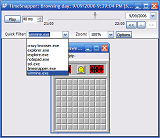
Quick Filter

Lets you view only the snapshots you're interested in.

quick filter

This little feature makes it much faster to translate a day of activity into something you can use to fill out a timesheet. The drop down list contains the name of every program that received focus throughout the day. Pick any one of them, and the timebar will be filtered to only show the snapshots for that program.

Filters

You can use a filter to make sure you only record the programs you want to record.

For example:

Don't record when I'm using MineSweeper

or: only record when I'm using Microsoft Excel

This was a commonly requested feature, and we tried to make it as flexible as possible.

Filters are configured right on the startup screen:

quick filter

You can have as many filters as you need:

TimeSnapper Filters List

And each filter has its own set of files to include or exclude:

TimeSnapper Filter Properties

Flags

Ability to add a note to any point in time.

For example: record when a phonecall occurred, or when you switched task.

Add a flag

Use this feature to pinpoint important moments in your day.

When you create a flag, it is added to the timebar, so you can quickly get back to that point in time.

Shortcuts Menu

Hit [Start-Key]+"S" to bring up the TimeSnapper shortcuts menu.

TimeSnapper Shortcuts Menu

Lets you quickly change mode, without lifting your hands from the keyboard.

Feedback, again with the Feedback!

As always, we (Atli and myself) are after your feedback. Any problems you have with the software, any suggestions, any stray thoughts... either leave a message at the forum -- forums.timesnapper.com/forums, or email us: support at timesnapper.com. (You can also leave a comment below, of course)


'Magnus Mendelyev' on Sun, 10 Sep 2006 20:02:35 GMT, sez:

Congrats LB!

We've all been waiting for the V2 release!

And the new features are great... now I don't have to worry about being caught out playing Minesweeper...

MM.


'hobit' on Thu, 14 Sep 2006 22:20:24 GMT, sez:

forums link is broken


'lb' on Thu, 14 Sep 2006 22:21:38 GMT, sez:

cheers hobit!! i'll fix it now.


name


website (optional)


enter the word:
 

comment (HTML not allowed)


All viewpoints welcome. But the right to delete any post for any reason is reserved. Don't make me do it. Comments may be republished, emailed to your loved ones or printed and used as toilet paper. Who reads this legal bit anyhow?

TimeSnapper is a life analysis system that stores and plays-back your computer use. It makes timesheet recording a breeze, helps you recover lost work and shows you how to sharpen your act.

TimeSnapper won last year's Developer Competition at Larkware.com, and is used by over 10,000 people.

Articles

Alan Kay on 'The Camel has Two Humps' Alan Kay on 'The Camel has Two Humps'
is the music inside the piano? is the music inside the piano?
The Bluffer's Guide To Yegge: Business Requirements R Bullsh*t The Bluffer's Guide To Yegge: Business Requirements R Bullsh*t
Prototype Ready for Launch Prototype Ready for Launch
Idea: a poor man's eye-tracking heatmap for win forms Idea: a poor man's eye-tracking heatmap for win forms
'The Register' seems to have plagiarised Mary Jo Foley 'The Register' seems to have plagiarised Mary Jo Foley
A magic goal for software businesses A magic goal for software businesses
A to Z of Software Methodologies A to Z of Software Methodologies
TimeSnapper in Music! TimeSnapper in Music!
Fixing problems can give you a glimpse of something terrible Fixing problems can give you a glimpse of something terrible
Web Tablet: Toward Less Complexity Web Tablet: Toward Less Complexity
Do they store the code for TFS in TFS? Do they store the code for TFS in TFS?
Sudden TimeSnapper Discount! Sudden TimeSnapper Discount!
How Can Microsoft Beat Google? How Can Microsoft Beat Google?
TimeSnapper 3.1: Attack of the the Red/Green Stripes TimeSnapper 3.1: Attack of the the Red/Green Stripes
21 tools used in our MicroISV 21 tools used in our MicroISV
Lost Treasures of the DOS World: tree! Lost Treasures of the DOS World: tree!
The Virtual Machine Machine and the Virtual Virtual Machine The Virtual Machine Machine and the Virtual Virtual Machine
Should Linq To Sql Go Should Linq To Sql Go "Open Source"?
Redux: New Synchronisation Idea Overlooked By Microsoft Redux: New Synchronisation Idea Overlooked By Microsoft
New Synchronisation Idea Overlooked By Microsoft Live team New Synchronisation Idea Overlooked By Microsoft Live team
Visual Studio UX Taskforce, Office UX Taskforce... etc. Visual Studio UX Taskforce, Office UX Taskforce... etc.
How to be Jeff Atwood How to be Jeff Atwood

Archives .: secretGeek :: Complete Archives :.
25 steps for building a Micro-ISV 25 steps for building a Micro-ISV
3 minute guides -- babysteps in new technologies: powershell, JSON, watir, F# 3 Minute Guide Series
Top 10 SecretGeek articles Top 10 SecretGeek articles

Downloads

TimeSnapper -- Automated Screenshot Journal TimeSnapper.com    
Version 3.1: instant productivity profiles

ShinyPower (help with Powershell) ShinyPower
Now at CodePlex

Next Action NextAction
Managing the top of your mind


[powered by Google] 


World's Simplest Code Generator (html edition) World's Simplest Code Generator
Gradient Maker -- a tool for making background images that blend from one colour to another. Forget photoshop, this is the bomb. Gradient Maker
How to be depressed How to be depressed
You are not inadequate.


Recommended Reading

The Best Software Writing I
The Business Of Software (Eric Sink)

Recommended blogs

Jeff Atwood
Reginald Braithwaite
Joseph Cooney
Phil Haack
Scott Hanselman
Julia Lerman
Joel Pobar
Eric Sink
Joel Spolsky
Des Traynor

Aggregated Links

programming.reddit.com
dzone
dot net kicks

Human Link Machines

interesting finds
a continuous learner's weblog
arjan's world
n links today
new and notable
morning coffee
learning .net
weekly link post
(my del.icio.us account)

LinkedIn profile
 
home .: about .: sign up .: sitemap .: secretGeek RSS .: © Leon Bambrick 2006 .: privacy

home .: about .: sign up .: sitemap .: RSS .: © Leon Bambrick 2006 .: privacy