 secretGeek.net
Exec Inline AddIn for Visual Studio 2005 -- Get It Now
I still use the Exec-Inline addin now and then -- so I've updated it to work for VS 2005.
 Download ExecInline.zip
To install it:
- unzip this file -- ExecInline.zip -- into the folder:
"C:\Documents and Settings\{Your Username}\My Documents\Visual Studio 2005\Addins" - Next time you start visual studio 2005 the tools menu should contain a new item: '
ExecInline' with a smiley face icon. (if not, check the Addins menu to see that it's loaded)
(If the folder doesn't exist -- create it!)
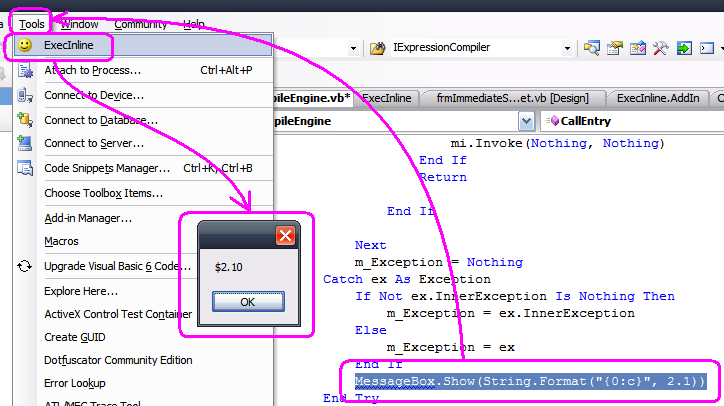
Select a snippet of your code, press 'ExecInline' -- and KAPOW! The snippet is executed all by itself.
Illustration:
As I've said before:
Next → ← Previous...all credit for this invention goes to these four places:
Code compilation retyped from jconwell's Dot Net Script Project at CodeProject.
Wrapper around compilation via dstang2000's DynamicCompileAndRun project.
Help with writing a VS Add-in: Scott Swigart, PasteAs Visual Basic Add-in
And help with getting the currently selected text from the IDE, via Kevin McFarlane's VS Csharp Macros page.
Also, the idea was partially inspired by Don Syme's F# interactive which I first saw mentioned on John Lam's website -- but mostly inspired by Ctrl-E from SQL Query Analyzer. In fact the more I look into this little side project the less credit I deserve. I am a flea on the back of bigger fleas, ad infinitum.
My book "Choose Your First Product" is available now.
It gives you 4 easy steps to find and validate a humble product idea.