 secretGeek.net
An Absolute Beginner's Babysteps In PowerShell...
In which i demonstrate that any old DOS hacker can download PowerShell (aka Monad) and teach it to themself, without any prior training or special knowledge, using any old XP machine.
What you need
- Windows .Net framework version 2.0
- Powershell (2.2 MB download... that's nothing!! Do it! Do it now!)
- [Optional: Powershell 'getting started' documentation (i haven't looked at this... that would be cheating)]
Okay -- so kick off the powershell (via the icon in your start menu, or by running 'powershell.exe' [located in C:\Program Files\Windows PowerShell\v1.0 for me.])
You'll be presented with a console, and a prompt.
Here's the prompt...
Windows(R) PowerShell
Copyright (C) 2006 Microsoft Corporation. All rights reserved.

PS C:\Program Files\Windows PowerShell\v1.0>
First thing I wanted to try was a few old faithful DOS
commands to see what happened:
PS C:\Program Files\Windows PowerShell\v1.0> cd\
'cd\' is not recognized as a cmdlet, function, operable program, or script file
.
At line:1 char:3
+ cd\ <<<<
okay.. cd\ didn't work... not to worry, i soon found
that it does work if you include the space
between command and parameter, like so:
PS C:\Program Files\Windows PowerShell\v1.0> cd \
PS C:\>     [Success!!]
I'd read enough about powershell to know that there isn't
really a 'CD' command. What's happening here is
that powershell has a lot of alias's defined, so that one command will
be channelled into another.
There's two distinct and powerful uses for these aliases:
- They help ease old dos-hacks like me into the powerShell world, by aliasing old command names on top of new cmdLets.
- They can provide abbreviations for commands, making you a much quicker scripter.
So, I know that cd works... but I want to find out
what the real command is that cd is acting as an alias for...
One way to do this, i figured would be to ask for help with the
'cd' command. Because then of course I'd see the
appropriate help for the real command that cd is acting
as an alias for.
In dos you can often get help by typping the command followed by
" /?".
I tried that first... here was the result:
PS C:\> cd /?
PS C:\d>
Weird result... and one i won't go into here. In any case it wasn't the result I expected. SO i slipped on the old riddling hat, i use for particularly riddlesome situations.
Okay, now every script language other than DOS shuns
the use of the slash to indicate parameters. (And if only early DOS
had used this same rule, the back slash would never have been needed
as a path delimiter...)
SO I tried the same request, this time with a hyphen:
PS C:\d> cd -?
The result was about two screens full of information... telling me
how to use the set-location command. Two lessons
learnt:
1. Use hyphens to indicate parameters, rather than back slashes!
2. "cd" is an alias for "set-location." Got it.
The help text started like this (i've highlighted one part):
NAME
   Set-Location

SYNOPSIS
   Sets the current working location to a specified location.


DETAILED DESCRIPTION
   The set-location Cmdlet sets the working location to a specified location.
   That location could be a directory, a sub-directory, a registry location, o
   r another location stack.
Groovy! You can use "cd" (i.e
"set-location") to navigate around the registry.
Infact here's the first example provided by the help text:
EXAMPLES
   EXAMPLE 1

   C:\PS>set-location HKLM:
Okay -- i recognise those letters, 'HKLM' -->
'HKey_Local_Machine' -- one of the root nodes of the
registry! Wicked stuff. I heard about this on a scott hanselman
podcast, but wasn't really paying attention at the time.
I guessed that 'set-location' is aliased as
'sl' and hopped into the registry, like so:
PS C:\> sl hklm:
PS HKLM:\>
I was happy to see that the parameter here wasn't case-sensitive. I tried a few variations on sl: SL, sL, Sl and they all worked okay too. Either calling a powerShell cmdLet isn't a case sensitive action, or *all* of those aliases are defined (which seemed unlikely). On a whim, and while think idly of jennifer garner i typed:
PS HKLM:\> alias
And i was happy to see a big long list of all the aliases in the system scroll by...
CommandType     Name                            Definition
-----------     ----                            ----------
Alias           ac                              Add-Content
Alias           asnp                            Add-PSSnapin
Alias           clc                             Clear-Content
Right down to...
Alias           move                            Move-Item
Alias           rd                              Remove-Item
Alias           ren                             Rename-Item
Alias           set                             Set-Variable
Alias           type                            Get-Content
Okay -- i could spend a while talking about those, but instead i'll just bring up a summary of the cmdLets that are aliased by my own 'most-used' DOS commands.
Translating Simple DOS Commands to Powershell cmdLets
|
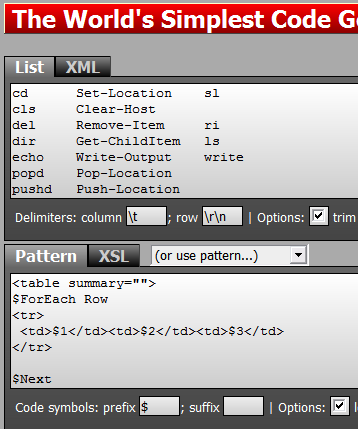
[sidebar: while i guess i could somehow use 'format-list' to convert the tab-separated list into a html table... i instead used the world's simplest code generator which got the job done quick n easy, like always.
 ]
]
Okay so before I go anyfurther I should pass along this other rule:
They're called 'cmdLets', not commands
You got that?
Getting More Help
Okay i decided i'd like to read some more built in help. I've heard that PowerShell has excellent built in help. But how to get it?
It turns out that 'help' is an alias for
'Get-Help' (the unix-friendly 'man' command
also works as an alias for 'Get-Help')
First observation with running these help commands is that the text often scrolls off the screen.
Running help on help (Help -?) tells me this:
"Get-help" and "-?" display help on one page. i.e. they scroll off the screen!

"Help" displays help on multiple pages. i.e. you get this after every screenful:
                                        "<SPACE> next page; <CR> next line; Q quit"
Another great tip in the help about help is to try this:
get-help *
because:
This lists every help file in the system along with what type of
help it is
So, now I've got hundreds of help topics at my fingertips... too many to read and remember in one go. [At this point i went off and wrote 'ShinyPower']
Best of all i know that this 'Get-Help' command is a general way in to the help system.
At this point i've learnt enough simple things that I'm not too afraid of it anymore. I can starting running around in it and really trying things out.
I'll write more about it when i get a chance.
Next → ← PreviousMy book "Choose Your First Product" is available now.
It gives you 4 easy steps to find and validate a humble product idea.