Enhance Reporting Services By Including A Function Library

First we write a .Net function library called:

  • DirtyThings.Dll.

It contains "Public Class BodilyFunctions ...", and:

'BodilyFunctions' includes a Function called "Pick_Your_Nose_And_Eat_It"

Now let's get our Reporting Services Report to use the 'Pick_Your_Nose_And_Eat_It' function!

  1. Copy DirtyThings.Dll into the Report Designer folder on our machine. This ensures that "Preview" will work while you are developing the report.

    (The default location of the Report Designer is C:\Program Files\Microsoft SQL Server\80\Tools\Report Designer)

  2. Copy DirtyThings.Dll onto the Server.

    It goes in the Report Directory Server, the default location of which is C:\Program Files\Microsoft SQL Server\MSSQL\Reporting Services\ReportServer\bin.

  3. Tell your Report to use the DirtyThings.Dll.

    How do we do this?

    In your Reporting Services Report:

    1. Go to the Report Properties dialog (Report Menu | Report Properties, or right-click the background of the report layout and choose 'Properties')

    2. In the References tab: Click the ellipsis buttons next to the 'References' listbox(i.e., the button with three dots on it)

    3. Use 'Browse' to find the 'DirtyThings.Dll' file. Click OK.

    4. In the "Classes" list box, type "DirtyThings.BodilyFunctions" in the Class Name column. ('DirtyThings' is the namespace of our class, and bodily functions is the class we want to instantiate.)

    5. Put "oBodilyFunctions" in the "Instance Name" column, this is the object we'll be using in our expressions.

    6. Click OK and close the Report Properties dialog

  4. Now we can access our functions from any expression in the report, by typing:

    (Or in a more general sense: 'Code.{instance Name}.{function name}' )


Oh yeh, those boring losers at msdn have also written up how it's done, in their article Deploying a Custom Assembly


I'm 13 percent of the way there.

Next time your random manager asks how far through that (indefinite) task she (sort of) assigned you, just answer:

This is the perfect answer. No one ever knows what response to give to thirteen percent. Clearly you're underway, but clearly there's a lot of work to be done. Better leave you alone...


readin tooooo much xml

I got an email in which some non-geek mentions 'an Asian stirfry/soup/noodle place'

and I can't help but go all Xpath, thinkin:

And wondering: why is noodle a child of soup? why is soup a child of stirfry?

Oh, food, right....


Use Your Instant Messenger To Query Amazon

Riaan van Schoor from InsideC has released a new Instant-Messenger based application, this one is for querying Amazon. To use it, just add 'amazon@insidec.com' to your list of messenger buddies (or if you use AOL, add 'InsideAmazon' to your list).

Here's a screenshot of the Amazon application in action:

One part of my brain says that this is just a toy, a gizmo, a gimmick, nothing more. But that's how a lot of great ideas look before they've really found their feet.


Computers Programmers On TV Shows

I rolled on the floor laughing at a technical blunder on Law and Order Criminal Intent (epsiode 42, Blink), last night.

My wife loves it when I roll on the floor laughing at technical blunders in TV shows.

Eames (Kathryn Erbe) is busy trying to guess the password to gain entry to a suspect's computer. She demonstrates her amazing knowledge of Defensive Programminhg Practices when she declares:

And yes, after three bad guesses, they are given a clue, in the form of a latin word, which Goren (Vincent D'Onofrio) correctly recognises as the name of a variety of octopus. The password then, is 'octopus'. They are in.

I don't know who is more to blame for this security blunder -- the shell programmers who give out hints to attackers, or the user who used a common English word as a password. Have they never heard of dictionary attacks? Either way, I think criminals have to seriously upgrade their security protocols.

And don't get me started on 'the DaVinci Code' -- 'Apple?' 'Apple?!'

(p.s. here's an older complaint about technical flaws in Law & Order.)


Too Many Damn Arrows in VS.Net!

You too can smack your head in wonder, at the simple features you have missed.

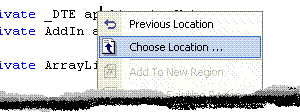
Mike Lansdaal did a very nice job of writing a 'Go Back' feature for Visual Studio.Net 2003 (thanks to the Daily Grind). It's nicely integrated into the IDE and so on, here's a little picture.

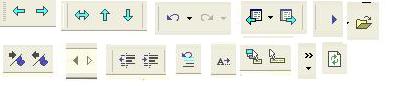
However, it's completely obsolete because the feature already exists up on the toolbar of Visual Studio.

Here's what Mike said when it was pointed out:

Well, what an embarrassment. I've been using VS2002 and 2003 for over three years now and I have to say that I never noticed those commands. I bet there are other features that I haven't used that are also waiting for discovery.

Mike's got no reason to be embarrassed. There's simply too many arrows on the toolbars of Visual Studio .Net.

How quickly can you name the purpose of all those arrows?


Four Thoughts For Friday

In the future, everyone will be infamous for two minutes. And they'll spend the rest of their time writing hate-mail to everyone else.

Okay, so imagine there's two people who work at a viagra company. If they attempt to discuss their work via email, does the spam blocker stop it?

Live life as if you only have four seconds to live. Cherish every wonderful moment, scream a lot and shout "Oh god! Help me! I'm about to die!"

Signs of a bad resume: Amongst the 'Work History' section they claim to have worked at 'Northwind Publishing' and 'AdventureWorks' bicycle wholesalers.