Step 2 of 25 to Building a Micro-ISV: Reliable Hosting

(See also, The complete list: 25 steps for building a Micro-ISV)

So, you've got a domain name that works for you (step 1). Now you need a space to host your domain and ultimately your product.

This step should take you around fifteen minutes to complete. For procrastinators, this could be around 15 days. ;-). It will cost a little bit of money (it's one of the few steps that does).

This was going to be a very short, "bullet points only" entry... it's turned out quite a bit longer... Here we go...

First here's what I think are the salient points on the topic:

  • don't host it yourself -- pay for hosting
  • don't choose a 'free' option -- pay for hosting
  • ensure they have a money back guarantee
  • check that the host will allow hosting of executables and zips
  • check that you're allowed to have a professional site
  • check that you won't hit any traffic limitations yet
  • decide what server-side technologies you require
  • look for feedback, good and bad
  • find an adequate one and sign up. Don't hesitate.

don't host it yourself -- pay for hosting

Fool-hardy people attempt to host professional websites on their own hardware. For amateur and hobby sites this is admirable and hardcore. But when trying to provide a professional product, hosting the website yourself must be attributed to a kind of 'not invented here syndrome' (see also) where you believe that anything outside your control is out of control.

The reality is that a dedicated hosting company with a good reputation will provide a far more robust and reliable solution than you can hope to offer from your lounge-room server. The price for reliable website hosting is astonishingly low as the market is so competitive.

don't choose a 'free' option -- pay for hosting

A lot of hosts offer a free option, as an introductory measure. This free option usually isn't suitable for a microisv because it often has limitations, such as restricted daily bandwidth allowances, and sometimes (less commonly now) includes their ads on your pages.

One more reason why the free hosting doesn't suit you: they often have restrictions saying you can't use this account to host a business. (I assume they do this for legal reasons -- they can't afford to be sued for lost revenue, over a hosting account they've given away for free)

ensure they have a money back guarantee

All reputable hosting companies should offer this. It's not like you've worn out their servers.

check that the host will allow hosting of executables and zips

Ultimately, you'll distribute your product in some binary form -- an executable, a zip or an msi file. Ensure that your host will let you publish these types of files. Similarly if your plans include the distributions of other filetypes, make sure that they're allowed by your host -- mp3's, for example, are banned from many hosting companies for fear of copyright violations.

check that you're allowed to have a professional site

Companies that don't host professional sites will make this pretty clear in their terms and conditions. Just a tiny point to watch out for.

check that you won't hit any traffic limitations yet

"If thirty percent of your visitors download your product, and three percent of the downloads result in a sale... how much bandwidth per month will you need to reach minimum wage? What if I get dugg?"

Really, these kind of equations are not necessary. Currently, companies will offer around 20 gig as their standard, and also offer 'unlimited' bandwidth options. Of course there's no such thing as unlimited bandwidth -- this usually means that the bandwidth limits are high enough that something else would break before you reached them.

A twenty gig download volume should be enough for a MicroISV. In a few years, we'll look back and laugh at it... but for today it works okay. You might like to know what's involved in upgrading to a large limit, in case that (happy) problem arrives in the next few months.

Similarly, the amount of space offered is rarely a problem today. You could probably get by on just 20 meg of space. But you'll be hard-pressed to find a package that gives you so little space. You'll easily find 200 meg of space, and more likely a gig.

In fact many of the issues that were once important when shopping around for a webhost can be pretty much taken for granted nowadays. The host will definitely offer FTP access, they'll have some nice kind of control panel, and so on.

decide what server-side technologies you require

The only technical aspect to your choice of hosting company lies in trying to predict the server side technology you'll need down the line.

At first your microISV website should be very simple. But it may end up requiring software such as:

  • Online Licensing Solution
  • Forum
  • Content Management System
  • Newsletter Management System
  • Help Desk System

And so on. I started to draw up a big decision tree with all the platform choices I'm aware of [operating system? (linux, windows, etc.) web server? (apache, IIS) databases? (mySQL, SQL Server, etc.)] But really all of that exciting stuff is irrelevant to you, the MicroISV. The level at which you need to get involved is more like: ASP.net or Ruby or PHP? What am I going to need?

I think this will be a fairly easy decision for you: few programmers are truly agnostic about web tools.

So the only real lesson is: even if you start with a static site make sure you've got some server-side pogramming capabilities. Your site won't stay static for long.

look for feedback, good and bad

Personally I use asp.net and 'classic' asp for my websites. Some of the hosts that have been recommended to me include:

If you google for each of these names, you will find a combination of good and bad reports. For example here's some positive experiences and some negative experiences about my host WebHost4Life.

So when looking for references -- don't expect all positive reports. No company can achieve that. Take all criticisms with a grain of salt -- was the webmaster somehow naive or in the wrong?

The most important thing you are looking for is proof that this is a real company that does successfully host websites, and won't dissappear tomorrow.

Find an adequate one and sign up. Don't hesitate.

Choosing a web host isn't rocket science. The most difficult part is having the courage to sign up. By making that step you're beginning to commit yourself to moving forward in your plans. So go ahead -- get this step out of the way and move on.

One last thing:

While I live in Australia I choose to host my sites in the US for two reasons: the prices are lower, and the server is geographically closer to more members of my target market (and therefore potentially faster). If you live on an island you might need to consider the same thing.

What do you think?

Are any of the points above unnecessary? Are there important points missing? Anything you disagree with? Any mistakes (or successes) you've had in the past that are relevant? Feedback is definitely needed.


 

Pure CSS method for achieving Right Angle Corners

By now I've seen dozens of articles that help you get rounded corners in your web pages, either using CSS, Javascript, Ajax, automatically-generated graphics on-the-fly, or a combination of all of these techniques.

But for a sharp, professional look -- nothing beats that right angle corner look, which remains popular on many websites.

But how to achieve this crisp effect? And how to guard against cross-browser compatability issues?

For example, it's no good getting 90 degree angles in firefox if opera renders them as 89 degrees, and IE gives you 95 degrees.

The trick is to use the following nice clean pure-CSS solution.

Now let's see it in action!

This box has the modern 'right-angle-cornersTM' look and feel!

Of course, this code is not production ready -- a true web designer would use a JSON script injection technique to generate the right angle corners on the fly, using prototype to slowly fade the corners from a standard rounded look and feel, into the high impact square look.

If you do use this code, I'd of course like a link-back, and a cut of any derived profits.

(stuck in sarcasm mode due to sleep deprivation)


Podcasts I like

I've had the chance to listen to a few of my favourite podcasts over the last week or so.

There seems to have been a recent outbreak of interviews with interesting people (if you're a programmer that is...).

Check out:

And when I feel like listening to nerdy stuff, rather than geeky stuff...


Lifelogging? Think TimeSnapper.com!

Lately I've seen all sorts of fascinating stuff about Lifelogging, lifestreaming, Lifebrowsing, the MyLifeBits project, clickstreams...

Basically, people are investigating ways of recording, storing, and searching everything they do. People are talking about all sorts of super clever gadgets, recorders, storage media, javascript hacks, mashups and more, to piece together their messy little Lifeloggers... One word people, TIMESNAPPER!

If 50% of your waking life is spent on a microsoft PC -- then you'll get 50% perfect lifestreaming with this one tool!.

And of course, we're thinking about features to take this further ;-)


A Girl

UX,

Yeh, you heard me.

Lily Jade Bambrick was born this morning, 1st February 2007, at 8:11.

She's light, just 2750 grams (6 pounds, 1 ounce), but of average length (50cm).

I have notified the officials from the guiness book of world records that this is probably the most beautiful baby ever born anywhere.

New mum, Le Shaz is doing brilliantly, and was last seen rock climbing at Kangaroo Point cliffs, while juggling six flaming chainsaws.

No photos just yet, but i will do the gushy-new-father thing and post up some pics in time.

Now back to work all you suckers who aren't on holiday ;-)


Step 1 of 25 to Building a Micro-ISV: Register a Domain

It's time to kick off the details of the 25 steps to building a micro-isv.

Due to the forthcoming birth of a child, these articles are going to be briefer than I originally intended. But hopefully they will be useful.

I know that my experience is limited, and I hope to gain useful feedback from you on every one of these points.

A lot of ideas will be expressed only in point form for now, as I don't have time to write them out in full, yet I don't want to leave them out entirely.

Now, on with it...

Registering a Domain

This is a milestone all by itself. I'd guess that ninety percent of good product ideas never get this far.

Here's my basic tips:

  • until you've secured a domain name, don't commit to a product name
  • don't expect to secure the perfect name
  • register the product name, not the company name (that can come much later)

until you've secured a domain name, don't commit to a product name

At some point in the distant past, perhaps one thousand years ago, there was the time of the cyber squatters. I don't know who these mythical people were, but I know that they are generally blamed for the following sad fact:

Twenty Four out of Every Twenty Five domain names you can think of have already been taken.

All sorts of dumb names have been taken, probably including that hot little product name you had your eyes on all this time. If you're an idiot you can waste your energy chasing that domain name; sending emails to the people who've taken in, you can try to talk them into selling it to you, you can send lawyers after it, you can really get nasty about the whole thing. Or worse still, you can stick with your product name, but choose a different domain name.

But if you're sensible, you'll start making a big lst of ugly useless names. Use a thesaurus. Name-storming is fun. Turn off the inner-critic.

  1. Make a big list of names. Twenty five or more is good.
  2. Sort them from most desired to least desired.
  3. For each name:
    1. Google it:
      1. Already used in prior-art? Discard it.
      2. Turns up as a swear word in spanish? Discard it.
      3. Anything else funny turns up on the web? Discard it.
    2. Perform a 'WhoIs' search. (use the "internic", "whois.net", "godaddy", whoever you want). The name is taken? Discard it.
    3. If it's available then buy it.
    4. Stop there. Throw away the rest of the list.

Now, you've got to fall in love with the name you ended up with. You've got no choice. You're stuck with it now, so you'd better treat it with respect.

And you're done. Easy wasn't it.

What? You're still there? You think I've got more strongly-felt opinions on this topic? You bet I do.

Buying is a minefield...

I use goDaddy for purchasing websites, because they're very very cheap. And I like an essay written by Bob Parsons, the go daddy himself. However.

These guys are masters at up selling. As you make your way to the checkout, they try to push dozens of other products into your shopping cart. All of which are totally overpriced crap. So make sure you buy only what you want -- a domain name for a year (maybe two) just for the domain you're after. Nothing else.

You can get a 10% discount (or more) if you find a discount voucher for Go Daddy. Google for 'godaddy voucher'. Didn't work for me, but ymmv.

Dot Com is All That Matters

Go for ".com". Don't mess around with ".net", ".biz" or any others. And don't waste your time on ones that relate to your country of origin, e.g. ".com.au", ".co.uk" unless your product will only ever be sold in that country. These cost more, involve more hoops, and are less memorable. The Coca-colonisation of the world is a big force, and I'm not going to try and slow it ;-)

Accept that there are no perfect product names.

Names can be cute, glib, memorable, descriptive, inspiring -- all kinds of things, but they can't be all of these things at once. It's very easy to over-constrain the name you want. The less rules you impose on the name, the better chance you have of coming up with a useable name.

Impose too many rules on the name results in an impossible equation. For example, say you have these two rules:

x + 1 = 2
x - 1 = 2
What is x?

In this case, x is unsolvable: there's simple no value for x that will satisfy both constraints. The only thing to do is to have less constraints. The same applies with choosing a name. You need less constraints: so few constraints that you'll be able to find the required twenty-five possible values, before you go searching the internet for availability.

Actually, Product Names Hardly Matter At All

Take Ebay, Google and Amazon as examples. These are well recognised brand names, that evoke the right reaction from millions of customers. But that recognition has been hard won by the companies and the products -- not by the choice of name. There's nothing great about any of these names. They tell you nothing about what the product does, nor what differentiates them from their competitors. But they're undeniably successful names.

Don't Be Too Specific

Okay -- even though 'Product Names Hardly Matter At All' there are still some terrible names out there, and perhaps even a few good ones.

Obviously, avoid offensive names. I went to uni with a guy who gave his engineering-thesis the acronym "S.H.I.T.S." I sh*t you not. This meant that everyone who reviewed his work had a negative perception before they'd even read the precis. Avoid causing offense, even mild offense.

Personally, I think it's bad to have an overly 'specific' name. An example of a specific name is a local company I know of who call themselves "Just Stumps". The idea is that they are focused on stump grinding. I've seen there name in a local newspaper and it's always bugged me. I rang them up one day and asked them, "Hey, i've got a tree that needs to be cut down. Do you do that?" Guess what! They do! "Oh, and I've got a concrete slab that needs to be removed, can you help with that?" Of course they can. Similarly "Just Jeans" don't just sell Jeans. "Roses Only" don't just sell roses, and in fact, every 'specific' name is a just a big lie. So don't turn yourself into a liar: avoid 'specific' names.

Did you run out of names before you found a good one?

An old trick is to mis-spell a word, creating a clever juxtaposition of two ideas. 'Beatles' for example. The advantage to this trick is that it creates new words (thus no prior art), that are short and will (eventually) be memorable.

On the topic of names... Got any suggestions for a baby name?

My good wife and I are open to possible names for our baby who we're expecting any day now. Unknown gender, so the field is wide open at this stage. We do have some names in mind already, but for a great suggestion -- who knows!


TimeSnapper 2.2 -- Auto Popup? That sounds terrible!

TimeSnapper version 2.2 was quietly released a few days ago. Atli poured his heart and soul into providing a few features that were requested by a number of people. I'd like to give a walk through of the new features, to see if they interest you, or if you've any feedback.

active-inactive

First up, it's now easier to see if TimeSnapper is currently recording, with a quick glance at the system tray. If TimeSnapepr is inactive (i.e, not recording) you'll see a big red cross through the tray icon.

More controversial, there's a new 'Auto Popup' feature. We have this turned off by default, because it's one of those "love it or hate it" features. Please read on though, because you'll need to decide for yourself if you love this feature, and then turn it on (in the options dialog) if you do.

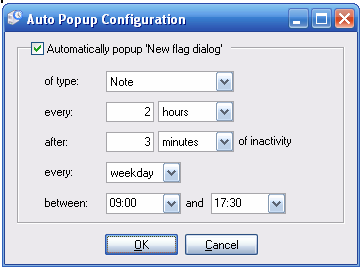
With 'Auto Popup' you can have TimeSnapper prompt you to create a new Note (or task, or flag) on a regular interval, say every half hour. This way you can be certain that there are no blank periods in your time.

Auto Popup Config

Okay -- before you say how annoying this idea is -- take note of one special detail, a 'unit of delight' that Atli has put in there, to stop this feature from breaking your concentration:

Auto Popup Config

TimeSnapper doesn't just show the popup right when you're in the middle of typing a sentence. It waits for a small pause of inactivity. In this example, it will wait 2 hours in between bugging you. And then it will only bug you when you've been inactive for three minutes. You could equally make it ten seconds.

I like this touch, as it stops the app from the kind of 'focus stealing' you get from other popup notification systems. Anyway -- enough on that feature. Download it and try it out, if you haven't already.

One last improvement: there is a (little known) 'global shortcut key' to bring up TimeSnapper -- "[Windows Key] plus [S]". Turns out, of course, that this clashes with other software. So this is now configurable, via the options screen.

Okay -- that's all for TimeSnapper 2.2 (aside from a number of bug fixes and optimisations). Once again we broke our rule of 'one new feature per release.' -- though it was Atli who wrote all the features this time around. Feedback much appreciated as always.

The next version (2.3) could be a little delayed, as we focus on supporting, and the impending new arrivals in our personal lives ;-).

Thanks for all the positive comments and feedback over the last few days since Hanselminutes. It's been a really fun time. Cheers.


25 steps for building a Micro-ISV

As promised, here's my 25 steps for building a Micro-ISV which are hard learned steps based on our experience getting TimeSnapper to where it is today. Each of these steps is both harder than it looks, and easier than you'd think.

It's hard because there are pitfalls, procrastination, misconceptions, anxiety, conflicting opinions and confusion at every step. It's easy because, hey, you're a smart guy or gal, so you can do this stuff in your sleep.

I'm planning to write a blog entry on each of these, and yes if things go very well, it may be a book someday ;-)

The big news is that Scott Hanselman interviewed me, about this list, for this week's episode of hanselminutes, out now! (Hanselminutes, for those who live under sedimentary deposits, is a weekly audio talk show with noted web developer and technologist Scott Hanselman.)

If you want to get some early tips on all of these topics, please listen to the show! It was a real blast doing the show -- far more excitement than this little geek is used to. Scott and Carl were very helpful with all the technical aspects, and Scott was just as sharp and witty as you'd hope.

(He sure was enthusiastic about TimeSnapper too, which really means a lot to us)

Now, on to the list!

  1. Register Domain
  2. Reliable hosting
  3. Website design
  4. Basic Website content
  5. Install traffic monitoring on your site
  6. Create forums, encourage feedback
  7. Maintain a FAQ
  8. Get the best screenshots you can
  9. Configure email for domain
  10. Get payment account
  11. Allow payment from your website
  12. Create a PAD file -- portable application description
  13. Register at download sites
  14. Strategy: separate "free" from "professional" products
  15. Get a suitable end user license agreement (EULA) -- infact get two!
  16. Auto update strategy
  17. License activation webservice/website
  18. Get a license management database
  19. Build a proper installer
  20. Obfuscate your assemblies
  21. Automate your build+release strategy
  22. Free up enough time/resources for dealing with support/feedback
  23. Shiny, Usable, Helpful
  24. Plan and enact your promotional strategy
  25. Do it all again

As each article comes out, i'll update this list to point to the relevant article.


Five More Things You Didn't Need To Know

phil haack, adam cogan and geoff appleby linked to me in regards to a meme called 'five things you didn't know about me'. and apparently for every person that doesn't continue the meme a cat gets shot. so here goes.

  1. The baby thing
  2. my excellent wife shaz and i have a baby due in four short weeks. This will be our first. my brother john and his wife allison had their first baby two weeks ago! and my sister jody and her hubby andrew had their first baby eight weeks ago. it's baby hour in the bambrick family.

  3. I has written four novels
  4. none of them published. if i could, i'd be a full time novelist.

  5. My first 'puter was an Amstra CPC 6128
  6. hence my first programming experience was with amstrad basic. mostly looking over my brother's shoulder.

  7. Here is a link to the first website i ever wroted
  8. welcome to the internet. includes the complete guide to the guitar for the beginner to intermediate to advanced player.

  9. i once tried to start a meme called "n minus 1 things you didn't know about me."
  10. If you were tagged by someone who had written "n" things (5 for example), then you'd write "n minus 1" things (4 in this example), and then you'd tag "n minus 1" people.

    For some reason it died out.

first i'm linking to everyone i know who's name matches this pattern "j%ooney". That would be:

next i'm linking to F# inventor don syme

Everyone on the internet has now been tagged by this meme. If you haven't yet been tagged, i have two tags left to give away ;-)